Chapter 43: Cloud Computing (AWS or Azure)
MODULE 7 | WEEK 43
Chapter 43: Cloud Computing (AWS or Azure)
In the previous two chapters we saw that Big Data runs on many machines . The question is: where do all these machines come from ? Building your own company data center is very expensive. The answer is the Cloud : you use the machines of companies like Amazon (AWS) or Microsoft (Azure) by renting them and pay only for as long as you use them. In this chapter we will learn the basic concepts of the cloud, the core services of AWS and Azure, IAM (security), storage, cost and how to run Big Data and ML on the cloud . You can choose either AWS or Azure : the concepts are the same in both; only the names differ.
TOPIC CHECKLIST (tick them off as you go)
-
☐ What the cloud is: pay-as-you-go, elasticity, global reach
-
☐ IaaS, PaaS, SaaS and Shared Responsibility
-
☐ Regions and Availability Zones
-
☐ AWS vs Azure: a map of core services
-
☐ IAM: users, roles, policies, least privilege
-
☐ Cloud storage: S3 / Azure Blob (boto3 and azure-storage-blob)
-
☐ Cloud cost: free tier, budget alerts, shutting things down
-
☐ A Big Data pipeline on the cloud (Spark: EMR/Databricks/Synapse)
-
☐ Deploying an ML model on the cloud: overview
-
☐ AWS or Azure: how to choose
43.1 What is the cloud?
Cloud computing means renting computing resources (servers, storage, databases, networking, software) over the internet , and paying only for what you use ( pay-as-you-go ). There is no need to buy your own data center or pay for electricity, cooling and staff.
Service models: IaaS, PaaS, SaaS
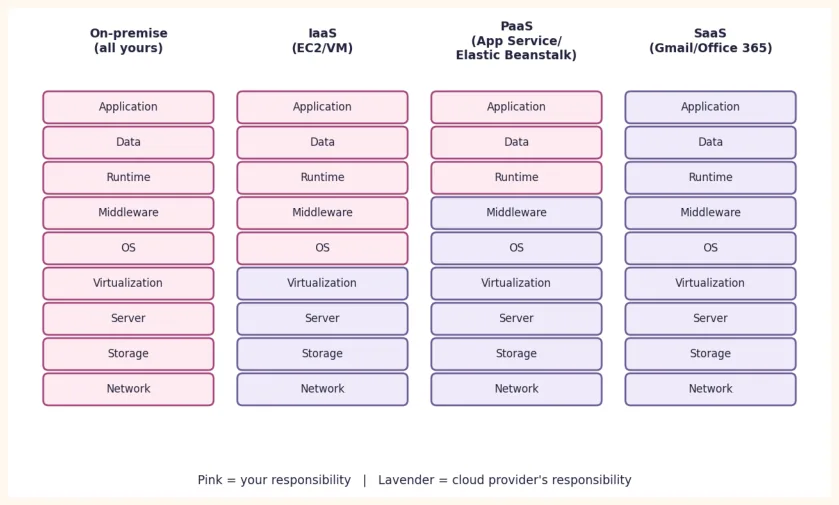
| Model | What you get | Example |
|---|---|---|
| IaaS(Infrastructure) | Virtual machine, storage, network; the OS and everything above it is yours | AWS EC2, Azure Virtual Machines |
| PaaS (Platform) | A ready platform; only your app/code is yours | AWS Elastic Beanstalk, Azure App Service, Databricks |
| SaaS(Software) | Use ready-made software | Gmail, Office 365, Salesforce |
Deployment models: Public cloud (companies like AWS/Azure, for everyone), Private cloud (for one company only), Hybrid (a mix of both) and Multi-cloud (more than one provider).
43.2 Regions and Availability Zones
-
Region: a geographic area of the world where the provider has data centers (for example Mumbai, Frankfurt, Dubai). You have to decide which region your data is kept in; three things are considered: latency (speed), law (which country the data stays in) and cost .
-
Availability Zone (AZ): separate data centers within a region (separate power and network). If one AZ goes down, the others keep running.
If you keep your app/data in several AZs , the service keeps running even if one data center fails; this is the same replication idea we saw in HDFS.
43.3 AWS vs Azure: a map of core services
| Task | AWS | Azure |
|---|---|---|
| Virtual machine | EC2 | Virtual Machines |
| Object storage (files/data lake) | S3 | Blob Storage / ADLS Gen2 |
|---|---|---|
| Relational database | RDS, Aurora | Azure SQL Database |
| Task | AWS | Azure |
|---|---|---|
| NoSQL database | DynamoDB | Cosmos DB |
| Security / access | IAM | Microsoft Entra ID + RBAC |
|---|---|---|
| Serverless function | Lambda | Azure Functions |
| Big Data / Spark cluster | EMR, Glue (Spark) | Databricks, Synapse, HDInsight |
| ETL / orchestration | Glue, Step Functions, MWAA (Airflow) | Data Factory |
| Data warehouse | Redshift | Synapse Analytics |
| SQL on data lake | Athena | Synapse serverless SQL |
| Streaming ingest | Kinesis, MSK (Kafka) | Event Hubs |
| Machine learning | SageMaker | Azure Machine Learning |
| Monitoring / billing | CloudWatch, Budgets | Azure Monitor, Cost Management |
43.4 The first 5 things to do after creating an account
-
MFA on the root/owner account (2-step verification): turn it on, and do not use that account for daily work.
-
Budget and billing alert : create one (for example an email at 5 USD) before anything else.
-
For daily work, create a separate IAM user/role (in Azure a separate user + RBAC) that has only the necessary permissions .
-
Choose your region (close and cheap) and create all resources in it.
-
Tags/names : follow a naming rule (
project=module8) so you can find and delete everything later.
43.5 IAM: who can do what?
IAM (Identity and Access Management) decides who (identity) can do what (action) on which thing (resource) . Basic terms:
| Term | Meaning | Example |
|---|---|---|
| User | The identity of a person/app | rania-dev |
| Group | A collection of users | data-team |
| Role | A set of permissions that anyone (a user or a service) can use for a short time; better than access keys | A role that lets EC2 read S3 |
| Policy | A document of permissions (JSON) | Permission to read just one bucket |
OUTPUT
Effect  : Allow
Actions : ['s3:GetObject', 's3:ListBucket']
Resource: 2 items
Is writing allowed? False
In Azure the same job is done with RBAC role assignment : for example, give a user or app the "Storage Blob Data Reader" role on a storage account (read only) or "Storage Blob Data Contributor" (read and write).
43.6 Cloud Storage: S3 and Azure Blob
Object storage (S3, Azure Blob) is the data lake of Big Data: cheap, practically unlimited and very reliable . Data lives in a bucket (AWS) / container (Azure) as objects (files) . An object has a key/path such as raw/2025/sales.csv (folders are really just part of the name).
AWS S3: with boto3
# pip install boto3
# Credentials: `aws configure` in the terminal, or environment variables.
# Never write an access key in your code.
import boto3
s3 = boto3.client("s3", region_name="ap-south-1")
# the bucket name must be unique across the whole world
bucket = "my-sales-bucket-rania-123"
s3.create_bucket(Bucket=bucket,
                 CreateBucketConfiguration={"LocationConstraint": "ap-south-1"})
s3.upload_file("sales.csv", bucket, "raw/sales.csv")        # upload
resp = s3.list_objects_v2(Bucket=bucket, Prefix="raw/")     # list
for obj in resp.get("Contents", []):
    print(obj["Key"], obj["Size"], "bytes")
s3.download_file(bucket, "raw/sales.csv", "sales_copy.csv") # download
OUTPUT (sample; the size will be that of your file)
raw/sales.csv 222952 bytes
Azure Blob Storage: with azure-storage-blob
# pip install azure-storage-blob
import os
from azure.storage.blob import BlobServiceClient
# take the connection string from an environment variable, not from the code
conn = os.environ["AZURE_STORAGE_CONNECTION_STRING"]
service = BlobServiceClient.from_connection_string(conn)
container = service.create_container("raw")      # container = the equivalent of a bucket
with open("sales.csv", "rb") as f:
    container.upload_blob("sales.csv", f)                  # upload
for blob in container.list_blobs():                        # list
    print(blob.name, blob.size, "bytes")
OUTPUT (sample)
sales.csv 222952 bytes
| Storage classes (the same idea everywhere) | When |
|---|---|
| Standard / Hot | Frequently used data |
| Infrequent / Cool | Read occasionally; cheaper storage, slightly more expensive access |
| Archive (Glacier / Archive tier) | Years-old backups; very cheap, slow to get back |
With a Lifecycle rule in place, data moves to a cheaper tier automatically (for example files older than 90 days go to Cool).
43.7 Cloud cost: calculate first, work later
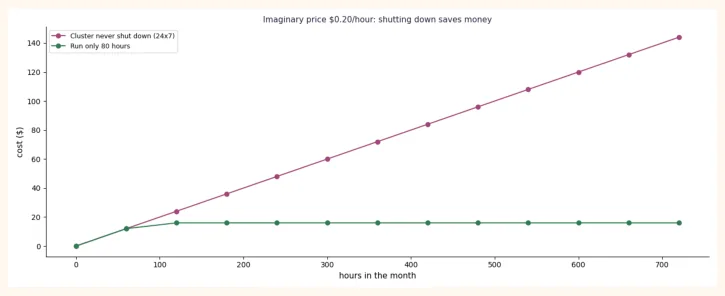
On the cloud, everything is billed : compute (machine time), storage (how much data), data transfer (taking data out) and services. A Spark cluster is billed for as long as it keeps running , even if you are not working . Let us look at a calculation with imaginary prices (this OUTPUT is real, but the prices are imaginary):
cluster_per_hour = 0.20        # imaginary:
$ per hour
storage_gb_month = 0.023       # imaginary:
$ per GB per month
storage_gb = 500
hours_24x7 = 24 * 30           # cluster left running the whole month
hours_used = 80                # run only while working
cost_a = cluster_per_hour * hours_24x7 + storage_gb * storage_gb_month
cost_b = cluster_per_hour * hours_used + storage_gb * storage_gb_month
print(f"Cluster 24x7        : ${cost_a:,.2f}")
print(f"Only 80 hours       : ${cost_b:,.2f}")
saved = cost_a - cost_b
print(f"Savings             : ${saved:,.2f}  ({saved / cost_a:.0%})")
OUTPUT
Cluster 24x7        : $155.50
Only 80 hours       : $27.50
Savings             : $128.00  (82%)
-
Budget + alert : set them up on day one (AWS Budgets / Azure Cost Management).
-
Cluster auto-terminate (shuts itself down when idle) or a transient cluster (create it for the job, remove it afterwards).
-
Spot / Low-priority instances: cheap but can be taken away; good for batch Spark.
-
Serverless (Athena, Lambda, Synapse serverless): you pay only while the query runs.
-
Data transfer should be kept low: keep compute and storage in the same region .
-
After the work, delete buckets, clusters, VMs, disks, IP addresses.
43.8 A Big Data pipeline on the cloud
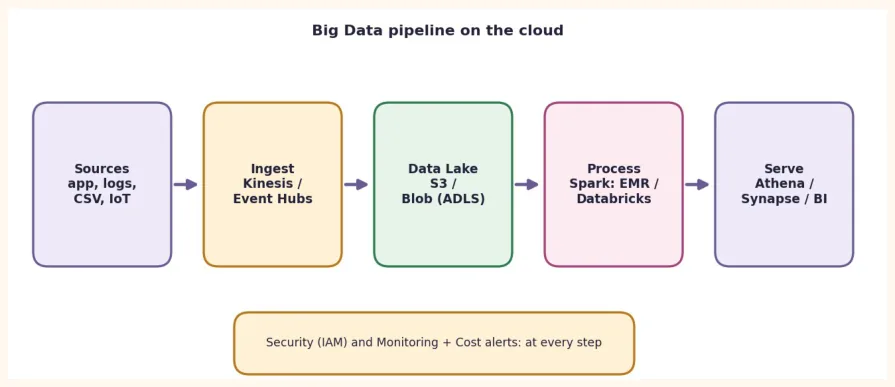
Now we connect Chapters 38-39 to the cloud. A typical pipeline looks like this:
| Step | AWS | Azure |
|---|---|---|
| Ingest(bringing data in) | Kinesis, S3 upload, DMS | Event Hubs, Data Factory |
| Store(data lake) | S3 | ADLS Gen2 / Blob |
| Process(Spark) | EMR, Glue | Databricks, Synapse Spark |
| Serve / Query | Athena, Redshift | Synapse, Power BI |
| Orchestrate | Step Functions, MWAA | Data Factory |
Connecting Spark to cloud storage is also the same DataFrame code; only the path changes (and the connector/credentials are already set up on the cluster):
# AWS S3
df = spark.read.parquet("s3a://my-sales-bucket-rania-123/curated/sales/")
# Azure Data Lake Storage Gen2
df = spark.read.parquet("abfss://curated@mystorageacct.dfs.core.windows.net/sales/")
# from here on the code is exactly the same in both
df.groupBy("category").count().show()
43.9 Running an ML model on the cloud: overview
To take a model built in Modules 4-6 off your laptop so that it works for everyone , there are several routes:
| Route | AWS | Azure | When |
|---|---|---|---|
| Managed ML platform | SageMaker (train + endpoint) | Azure Machine Learning | Training and deployment in one place, MLOps |
| Container | App Runner / ECS | Container Apps / App Service | FastAPI + Docker (as in Module 7) |
| Route | AWS | Azure | When |
|---|---|---|---|
| Serverless | Lambda | Azure Functions | A small API that runs occasionally |
| Virtual machine | EC2 | Azure VM | Full control; you have to manage it yourself |
The basic idea is the same everywhere: package the model + code (often with Docker) , run it on the cloud , secure it with IAM , watch logs/monitoring , and keep an eye on the cost .
43.10 AWS or Azure: how to choose?
| Question | Answer |
|---|---|
| Which should I learn first? | Whichever your class/instructor/company uses. The concepts are the same in both. |
| Free tier / credits? | Each has its own offers, which keep changing; check the official page. |
| Job market | Both are in demand; AWS has the bigger share, Azure is strong in Microsoft-based companies (enterprise). |
| Certification | To start:AWS Cloud PractitionerorMicrosoft AZ-900 / DP-900. |
| For Spark | AWS: EMR/Glue. Azure:Databricks/Synapse(Databricks runs on both too). |
43.11 Common Mistakes and Hands-on
KEY TAKEAWAYS
-
Cloud = computing rented over the internet, pay-as-you-go , elastic as needed.
-
IaaS (VM) -> PaaS (platform) -> SaaS (software): as you move up, your responsibility decreases .
-
Region (area) and Availability Zone (a separate data center): reliability through replication.
-
AWS and Azure have the same concepts: S3 = Blob/ADLS, EC2 = VM, IAM = Entra+RBAC, EMR = Databricks/Synapse.
-
Least privilege in IAM , MFA , never keys in code ; remember the Shared Responsibility model.
-
Keep storage and compute separate : the data lake in S3/ADLS, the Spark cluster only while working.
-
Budget alert first, delete resources after the work.