Chapter 23: Convolutional Neural Networks (CNN)
MODULE 5 | WEEK 23
Chapter 23: Convolutional Neural Networks (CNN)
Tasveeron ke liye ek aam (Dense) network bohat kamzor hai. Convolutional Neural Network (CNN) ko khaas taur par images ke liye banaya gaya hai, aur aaj chehra pehchanne, X-ray parhne, self-driving gaariyon aur phone ke camera tak sab me yehi chalta hai. Is chapter me hum dekhenge ke convolution, filter, stride, padding, pooling kya hain, CNN ki banawat kaisi hoti hai, parameters kaise ginte hain, aur Keras me CNN kaise banta hai.
23.1 Image data kya hota hai?
Computer ke liye tasveer numbers ka jaal (grid) hai. Har number ek pixel ki roshni hai. Greyscale tasveer me ek channel hota hai (0 = kala, bara number = safed). Rangeen (RGB) tasveer me 3 channels (Red, Green, Blue) hote hain. Is liye tasveer ki shape hoti hai (height, width, channels) .
import numpy as np
from sklearn.datasets import load_digits
digits = load_digits()
img = digits.images[3]               # ek tasveer
print("Shape      :", img.shape, "(height, width) greyscale")
print("Min / Max  :", img.min(), "/", img.max())
print("Label      :", digits.target[3])
print(img.astype(int))
OUTPUT
Shape      : (8, 8) (height, width) greyscale
Min / Max  : 0.0 / 15.0
Label      : 3
[[ 0  0  7 15 13  1  0  0]
 [ 0  8 13  6 15  4  0  0]
 [ 0  2  1 13 13  0  0  0]
 [ 0  0  2 15 11  1  0  0]
 [ 0  0  0  1 12 12  1  0]
 [ 0  0  0  0  1 10  8  0]
 [ 0  0  8  4  5 14  9  0]
 [ 0  0  7 13 13  9  0  0]]
Chapter 8 me hum ne Digits dekhe the. Ek rangeen tasveer (jaise 224x224 ki photo) me
224 x 224 x 3 = 150,528
numbers hote hain.
| Tasveer | Shape (H, W, C) | Kul numbers |
|---|---|---|
| Digits (hamara dataset) | (8, 8, 1) | 64 |
| MNIST haath se likhe number | (28, 28, 1) | 784 |
| CIFAR-10 chhoti rangeen tasveer | (32, 32, 3) | 3,072 |
| Tasveer | Shape (H, W, C) | Kul numbers |
|---|---|---|
| Aam photo | (224, 224, 3) | 150,528 |
23.2 Dense network images ke liye kyun nakafi?
Agar hum 224x224x3 ki tasveer ko seedha Dense layer me daalein (Flatten kar ke) aur sirf 1000 neurons rakhein, to sirf pehli layer ke weights hi 150,528 x 1000 = 15 crore se zyada ho jate hain. Dusri wajah: Dense network jagah (position) ka ehsas kho deta hai, kyun ke pixels ko ek lambi qatar bana deta hai, jab ke qareeb ke pixels ka rishta images me sab se ahem hai.
pixels = 224 * 224 * 3
print("Input numbers:", pixels)
print("Dense(1000) ke weights + bias:", pixels * 1000 + 1000)
print("Conv2D(32 filters, 3x3) ke weights + bias:", 3 * 3 * 3 * 32 + 32)
OUTPUT
Input numbers: 150528
Dense(1000) ke weights + bias: 150529000
Conv2D(32 filters, 3x3) ke weights + bias: 896
CNN ka jawab: chhote filters poori tasveer par ghoom kar wohi weights dobara dobara istemal karte hain ( weight sharing ). Is se parameters bohat kam hote hain.
23.3 Convolution: filter ka tasveer par ghoomna
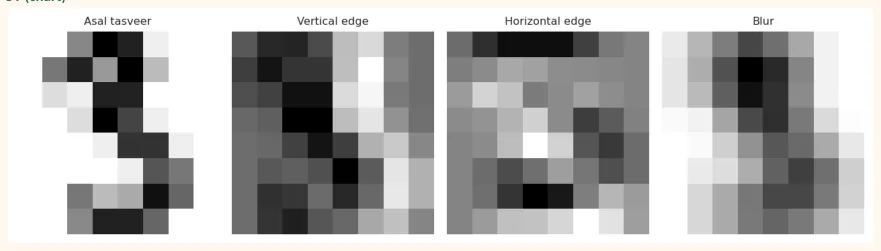
Filter (kernel) ek chhota number-grid hai (maslan 3x3). Is ko tasveer ke upar rakh kar hum-position numbers ko guna kar jama karte hain; ye ek output pixel banata hai. Phir filter ek qadam ( stride ) aage jata hai. Pori tasveer par ghoomne se jo nayi tasveer banti hai use feature map kehte hain.
ANALOGY / MISAAL
Ek torch jo chhoti si jagah roshan karti hai. Tum torch ko poori deewar par ghuma ghuma kar dekhti ho ke "yahan seedhi lakeer hai? yahan kona hai?". Filter wohi torch hai aur har filter ek khaas cheez dhoondta hai (khadi lakeer, leti lakeer, kona).
def conv2d(image, kernel, stride=1, padding=0):
    if padding > 0:
        image = np.pad(image, padding)          # kinaron par zero
        kh, kw = kernel.shape
        out_h = (image.shape[0] - kh) // stride + 1
        out_w = (image.shape[1] - kw) // stride + 1
        out = np.zeros((out_h, out_w))
        for i in range(out_h):
            for j in range(out_w):
                patch = image[i*stride:i*stride+kh, j*stride:j*stride+kw] out[i, j] = np.sum(patch * kernel)
            return out
small = np.array([[1, 2, 0, 1], [0, 1, 3, 1], [2, 1, 0, 0], [1, 0, 1, 2]], dtype=float)
kernel = np.array([[1, 0], [0, -1]], dtype=float)
print(conv2d(small, kernel))
OUTPUT [[ 0. -1. -1.]
 [-1.  1.  3.]
 [ 2.  0. -2.]]
Haath se check: upar-left 2x2 hissa [[1,2],[0,1]] ko filter [[1,0],[0,-1]] se guna karo:
1*1 + 2*0 + 0*0 + 1*(-1) = 0
, aur output ka pehla number 0 aaya. Ab asli filters ( edge detectors ) ek Digits tasveer par:
import matplotlib.pyplot as plt
img = digits.images[3] / 16.0
vertical   = np.array([[-1, 0, 1], [-2, 0, 2], [-1, 0, 1]], dtype=float)   # khadi lakeerein
horizontal = vertical.T                                                    # leti lakeerein
blur       = np.ones((3, 3)) / 9                                           # dhundla
maps = {"Asal tasveer": img,
"Vertical edge": conv2d(img, vertical, padding=1),
"Horizontal edge": conv2d(img, horizontal, padding=1),
"Blur": conv2d(img, blur, padding=1)}
fig, axes = plt.subplots(1, 4, figsize=(10, 2.8))
for ax, (name, m) in zip(axes, maps.items()):
    ax.imshow(m, cmap="gray_r", interpolation="nearest")
    ax.set_title(name, fontsize=9)
    ax.axis("off")
    plt.tight_layout()
    plt.show()
OUTPUT (chart)
23.4 Stride, Padding aur Output ka size
Stride: filter ek baar me kitne pixel aage jaye (1 ya 2). Bara stride = chhota output. Padding: tasveer ke kinaron par zero lagana. valid padding = koi zero nahi (output chhota hota hai). same padding = itne zero ke output ka size input jaisa rahe (stride 1 par).
Output size = floor( (N + 2P - F) / S ) + 1
N = input size    F = filter size    P = padding    S = stride
def out_size(N, F, P=0, S=1):
    return (N + 2 * P - F) // S + 1
print("8x8, 3x3 filter, valid (P=0), S=1 :", out_size(8, 3, 0, 1))
print("8x8, 3x3 filter, same  (P=1), S=1 :", out_size(8, 3, 1, 1))
print("8x8, 3x3 filter, P=0, S=2         :", out_size(8, 3, 0, 2))
print("28x28, 5x5 filter, P=0, S=1       :", out_size(28, 5, 0, 1))
print("224x224, 7x7 filter, P=3, S=2     :", out_size(224, 7, 3, 2))
OUTPUT
8x8, 3x3 filter, valid (P=0), S=1 : 6
8x8, 3x3 filter, same  (P=1), S=1 : 8
8x8, 3x3 filter, P=0, S=2         : 3
28x28, 5x5 filter, P=0, S=1       : 24
224x224, 7x7 filter, P=3, S=2     : 112
23.5 ReLU aur Pooling
Convolution ke baad ReLU lagate hain (negative values ko 0 kar do). Phir Pooling tasveer ka size chhota karta hai taake computation kam ho aur network chhoti hilne-julne waali tabdeeliyon (maslan number thora sa idhar udhar) se na ghabraye . Max Pooling har hisse me se sab se bara number rakhta hai.
def max_pool(fmap, size=2):
    h, w = fmap.shape[0] // size, fmap.shape[1] // size
    out = np.zeros((h, w))
    for i in range(h):
        for j in range(w):
            out[i, j] = fmap[i*size:(i+1)*size, j*size:(j+1)*size].max()
        return out
fmap = np.array([[1, 3, 2, 1],
[4, 6, 5, 0],
[7, 2, 9, 8],
[1, 0, 3, 4]], dtype=float)
print("Feature map:\n", fmap)
print("Max pool 2x2:\n", max_pool(fmap))
print("Average pool 2x2:\n", fmap.reshape(2, 2, 2, 2).mean(axis=(1, 3)))
OUTPUT
Feature map:
 [[1. 3. 2. 1.]
 [4. 6. 5. 0.]
 [7. 2. 9. 8.]
 [1. 0. 3. 4.]]
Max pool 2x2:
 [[6. 5.]
 [7. 9.]]
Average pool 2x2:
 [[3.5 2. ]
 [2.5 6. ]]
23.6 CNN ki poori banawat
Aam CNN ek dohrati hui tarteeb hota hai: [Conv -> ReLU -> Pool] kai baar, phir Flatten , phir Dense layers, aur aakhir me softmax/sigmoid .
Tasveer -> [Conv+ReLU -> Pool] -> [Conv+ReLU -> Pool] -> Flatten -> Dense -> Softmax
  Pehla hissa: FEATURE EXTRACTION (tasveer se features nikalna)
  Doosra hissa: CLASSIFICATION (features se faisla)
Pehli layers ki tasveer chhoti hoti jati hai (Pool se) magar channels (filters) barhte jate hain (16, 32, 64...). Is liye hum ek tasveer ka size ghata kar usme zyada qism ke features bhar dete hain.
Parameters ki ginti
Conv2D parameters = (filter_h x filter_w x input_channels + 1) x filters
Dense parameters  = (inputs + 1) x neurons
Pooling, Flatten, Dropout = 0 parameters
def conv_params(fh, fw, in_ch, filters): return (fh * fw * in_ch + 1) * filters
def dense_params(inputs, neurons):          return (inputs + 1) * neurons
c1 = conv_params(3, 3, 1, 16)      # Digits (8,8,1) par 16 filters
c2 = conv_params(3, 3, 16, 32)     # 32 filters
d1 = dense_params(2 * 2 * 32, 64)  # Flatten ke baad 128 numbers
d2 = dense_params(64, 10)
print("Conv2D(16, 3x3) :", c1)
print("Conv2D(32, 3x3) :", c2)
print("Dense(64)       :", d1)
print("Dense(10)       :", d2)
print("Kul CNN         :", c1 + c2 + d1 + d2)
print("Muqabla: sirf Dense network 64->128->64->10:",
      dense_params(64, 128) + dense_params(128, 64) + dense_params(64, 10))
OUTPUT
Conv2D(16, 3x3) : 160
Conv2D(32, 3x3) : 4640
Dense(64)       : 8256
Dense(10)       : 650
Kul CNN         : 13706
Muqabla: sirf Dense network 64->128->64->10: 17226
23.7 Data ko CNN ke liye tayyar karna
CNN ko input chahiye (samples, height, width, channels) . Digits ki tasveerein 2D hain, to ek channel ka axis jodna hoga. Pixels ko 0 se 1 ke beech scale karte hain (16 se taqseem).
from sklearn.model_selection import train_test_split
X = digits.images / 16.0                 # (1797, 8, 8), 0 se 1
y = digits.target
X = X[..., np.newaxis]                   # (1797, 8, 8, 1)  channel axis
print("CNN input shape:", X.shape)
X_tr, X_te, y_tr, y_te = train_test_split(X, y, test_size=0.25,
random_state=42, stratify=y)
print("Train:", X_tr.shape, " Test:", X_te.shape)
print("Pixel range:", X_tr.min(), "se", X_tr.max())
OUTPUT
CNN input shape: (1797, 8, 8, 1)
Train: (1347, 8, 8, 1)  Test: (450, 8, 8, 1)
Pixel range: 0.0 se 1.0
23.8 Keras me CNN
from tensorflow import keras
from tensorflow.keras import layers
cnn = keras.Sequential([
keras.Input(shape=(8, 8, 1)),
layers.Conv2D(16, (3, 3), padding="same", activation="relu"),
layers.MaxPooling2D((2, 2)),
layers.Conv2D(32, (3, 3), padding="same", activation="relu"),
layers.MaxPooling2D((2, 2)),
layers.Flatten(),
layers.Dense(64, activation="relu"),
layers.Dense(10, activation="softmax"),
])
cnn.compile(optimizer="adam",
loss="sparse_categorical_crossentropy",
metrics=["accuracy"])
cnn.summary()
OUTPUT (namoona)
Model: "sequential"
┏━━━━━━━━━━━━━━━━━━━━━━━━━━━━━━━━━━━┳━━━━━━━━━━━━━━━━━━━━━━━━━━┳━━━━━━━━━━━━━━━━━┓
┃ Layer (type)                       Output Shape                      Param # ┃┃┃
┡━━━━━━━━━━━━━━━━━━━━━━━━━━━━━━━━━━━╇━━━━━━━━━━━━━━━━━━━━━━━━━━╇━━━━━━━━━━━━━━━━━┩
│ conv2d (Conv2D)                   │ (None, 8, 8, 16)         │             160 │
│ max_pooling2d (MaxPooling2D)      │ (None, 4, 4, 16)         │               0 │
│ conv2d_1 (Conv2D)                 │ (None, 4, 4, 32)         │           4,640 │
│ max_pooling2d_1 (MaxPooling2D)    │ (None, 2, 2, 32)         │               0 │
│ flatten (Flatten)                 │ (None, 128)              │               0 │
│ dense (Dense)                     │ (None, 64)               │           8,256 │
│ dense_1 (Dense)                   │ (None, 10)               │             650 │
└───────────────────────────────────┴──────────────────────────┴─────────────────┘
 Total params: 13,706 (53.54 KB)
 Trainable params: 13,706 (53.54 KB)
 Non-trainable params: 0 (0.00 B)
OUTPUT (namoona)
CNN test accuracy: 0.98
Predicted : [1 0 9 1 5]
Asli      : [1 0 9 1 5]
OUTPUT
Conv features shape: (1347, 48) (har tasveer ke 48 features)
Raw pixels par accuracy      : 0.962
Conv features par accuracy   : 0.96
Is chhote tajurbe me dono ka nateeja qareeb qareeb ek jaisa aaya, kyun ke humne sirf 3 fixed filters lagaye aur Digits pehle hi asaan data hai. Asli CNN me filters seekhe jate hain (16, 32, 64 ya zyada), isi liye bari aur mushkil tasveeron par wo hath se banaye hue features se kahin behtar hota hai.
23.9 Data Augmentation
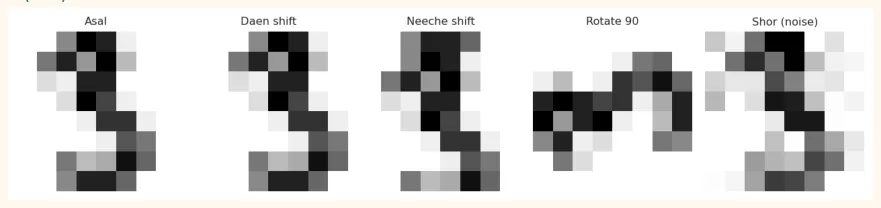
CNN ko bohat saari tasveerein chahiye. Jab data kam ho, to Data Augmentation se wohi tasveer ko thora sa badal kar (shift, rotate, zoom, flip) nayi tasveerein bana lete hain. Network ko lagta hai data zyada hai, aur wo overfit kam karta hai.
fig, axes = plt.subplots(1, 5, figsize=(10, 2.2))
im = digits.images[3]
variants = {"Asal": im,
"Daen shift": np.roll(im, 1, axis=1),
"Neeche shift": np.roll(im, 1, axis=0),
"Rotate 90": np.rot90(im),
"Shor (noise)": np.clip(im + np.random.RandomState(0).randn(8, 8) * 2, 0, 16)}
for ax, (name, v) in zip(axes, variants.items()):
    ax.imshow(v, cmap="gray_r", interpolation="nearest")
    ax.set_title(name, fontsize=9)
    ax.axis("off")
    plt.tight_layout()
    plt.show()
OUTPUT (chart)
DHYAN RAKHO
Augmentation maqsad ke mutabiq chuno. Number 6 ko 180 degree ghuma do to wo 9 ban jata hai, to digits par bade rotation galat hain. Billi ki tasveer ko ulta karna (horizontal flip) theek hai.
augment = keras.Sequential([
layers.RandomTranslation(0.1, 0.1),   # 10% tak shift
layers.RandomRotation(0.05),          # thora sa ghumao
layers.RandomZoom(0.1),
])
aug_cnn = keras.Sequential([
keras.Input(shape=(8, 8, 1)),
augment,                              # sirf training me chalta hai
layers.Conv2D(16, 3, padding="same", activation="relu"),
layers.MaxPooling2D(),
layers.Flatten(),
layers.Dense(10, activation="softmax"),
])
Augmentation layers sirf training me active hoti hain; predict/evaluate me khud band ho jati hain, to test data par koi asar nahi parta.
23.10 Aam Galtiyan aur Hands-on
AAM GALTIYAN
-
Input shape ghalat: CNN ko
(samples, H, W, channels)chahiye, 2D array nahi (channel axisnp.newaxisse jodo). -
Pixels scale na karna: 0 se 255 (ya 16) seedha dena,
/255.0bhoolna. -
Conv ke baad Flatten bhoolna aur seedha Dense lagana.
-
Bohat zyada pooling: tasveer itni chhoti ho jaye ke maloomat khatam.
-
Test data par augmentation lagana (sirf training par lagao).
-
Chhote data par bohat bara CNN: overfitting; augmentation, Dropout aur chhota network.
Hands-on
-
Haath se conv:
conv2dfunction se 3x3 filter[[0,1,0],[1,-4,1],[0,1,0]]Digits ki kisi tasveer par chala kar chart banao. -
Output size: formula se 28x28 par 3x3 conv (valid) aur uske baad 2x2 pool ka size nikalo.
-
Parameters: Conv2D(64, 3x3) jo 32 channels par chalay, uske parameters khud ginno aur
model.summary()se milao. -
Filters badlo: CNN me 16/32 ko 8/16 aur 32/64 karo; accuracy aur parameters ka muqabla likho.
-
Apni tasveer: Colab me
keras.datasets.fashion_mnistload kar ke ek CNN banao (28x28x1) aur confusion matrix banao.
KEY TAKEAWAYS
-
Image = numbers ka grid, shape (H, W, C). Greyscale 1 channel, RGB 3 channels.
-
Convolution: chhota filter tasveer par ghoomta hai aur feature map banata hai. Weights share hote hain, is liye parameters kam.
-
Output size = floor((N + 2P - F) / S) + 1.
samepadding size barqarar rakhta hai. -
ReLU non-linearity lata hai; Max Pooling size ghatata hai aur chhoti tabdeeliyon se bachata hai.
-
CNN = [Conv-ReLU-Pool] x kai baar, phir Flatten aur Dense classifier.
-
Conv params = (fh x fw x in_ch + 1) x filters. Pool/Flatten/Dropout ke parameters 0.
-
Chhote data par Data Augmentation aur Dropout se overfitting kam karo.